
你的位置:首页 > 互联网IT
倒计时,顺计时,倒数日,历史计时器,记日子,网站运行时间,网站计时,网页计时,网页倒计时,网页倒计时,二
系统:
软件:网页
功能:倒计时,记时间,网站运行时间
下载地址一:
保存网页.html
倒计时
<!DOCTYPE html>
<html>
<head>
<meta charset="UTF-8">
<meta name="viewport" content="width=device-width, initial-scale=1.0">
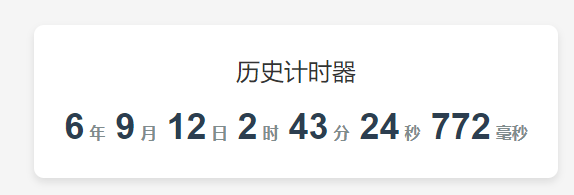
<title>历史计时器</title>
<style>
body {
font-family: Arial, sans-serif;
display: flex;
justify-content: center;
align-items: center;
height: 100vh;
margin: 0;
background-color: #f5f5f5;
}
.timer-container {
text-align: center;
background-color: white;
padding: 30px;
border-radius: 10px;
box-shadow: 0 4px 8px rgba(0, 0, 0, 0.1);
}
.timer-title {
font-size: 24px;
margin-bottom: 20px;
color: #333;
}
.timer {
font-size: 36px;
font-weight: bold;
color: #2c3e50;
}
.timer-unit {
font-size: 16px;
color: #7f8c8d;
margin-left: 5px;
}
</style>
</head>
<body>
<div>
<div>历史计时器</div>
<div>
<span id="years">0</span><span>年</span>
<span id="months">0</span><span>月</span>
<span id="days">0</span><span>日</span>
<span id="hours">0</span><span>时</span>
<span id="minutes">0</span><span>分</span>
<span id="seconds">0</span><span>秒</span>
<span id="milliseconds">000</span><span>毫秒</span>
</div>
</div>
<script>
// 设置起始日期(可自定义修改)
const startDate = new Date('2020-01-01T00:00:00');
function updateTimer() {
const now = new Date();
const diff = now - startDate;
// 计算毫秒(确保3位数)
const milliseconds = String(diff % 1000).padStart(3, '0');
// 计算秒
const totalSeconds = Math.floor(diff / 1000);
const seconds = totalSeconds % 60;
// 计算分钟
const totalMinutes = Math.floor(totalSeconds / 60);
const minutes = totalMinutes % 60;
// 计算小时
const totalHours = Math.floor(totalMinutes / 60);
const hours = totalHours % 24;
// 计算天数
const totalDays = Math.floor(totalHours / 24);
// 计算年份和月份(精确计算)
let years = now.getFullYear() - startDate.getFullYear();
let months = now.getMonth() - startDate.getMonth();
let days = now.getDate() - startDate.getDate();
if (days < 0) {
months--;
// 获取上个月的天数
const lastDayOfMonth = new Date(
now.getFullYear(),
now.getMonth(),
0
).getDate();
days += lastDayOfMonth;
}
if (months < 0) {
years--;
months += 12;
}
// 更新显示
document.getElementById('years').textContent = years;
document.getElementById('months').textContent = months;
document.getElementById('days').textContent = days;
document.getElementById('hours').textContent = hours;
document.getElementById('minutes').textContent = minutes;
document.getElementById('seconds').textContent = seconds;
document.getElementById('milliseconds').textContent = milliseconds;
}
// 初始更新
updateTimer();
// 每毫秒更新一次
setInterval(updateTimer, 1);
</script>
</body>
</html>
--------------------------------------------------------------------------------------
保存网页.html
顺计时
<!DOCTYPE html>
<html>
<head>
<meta charset="UTF-8">
<meta name="viewport" content="width=device-width, initial-scale=1.0">
<title>离过年还有</title>
<style>
body {
font-family: Arial, sans-serif;
display: flex;
justify-content: center;
align-items: center;
height: 100vh;
margin: 0;
background-color: #f5f5f5;
}
.timer-container {
text-align: center;
background-color: white;
padding: 30px;
border-radius: 10px;
box-shadow: 0 4px 8px rgba(0, 0, 0, 0.1);
}
.timer-title {
font-size: 24px;
margin-bottom: 20px;
color: #333;
}
.timer {
font-size: 36px;
font-weight: bold;
color: #2c3e50;
}
.timer-unit {
font-size: 16px;
color: #7f8c8d;
margin-left: 5px;
}
</style>
</head>
<body>
<div>
<div>离过年还有</div>
<div>
<span id="years">0</span><span>年</span>
<span id="months">0</span><span>月</span>
<span id="days">0</span><span>日</span>
<span id="hours">0</span><span>时</span>
<span id="minutes">0</span><span>分</span>
<span id="seconds">0</span><span>秒</span>
<span id="milliseconds">000</span><span>毫秒</span>
</div>
</div>
<script>
// 设置起始日期(可自定义修改)
const startDate = new Date('2026-02-16T00:00:00');
function updateTimer() {
const now = new Date();
const diff = startDate - now;
// 计算毫秒(确保3位数)
const milliseconds = String(diff % 1000).padStart(3, '0');
// 计算秒
const totalSeconds = Math.floor(diff / 1000);
const seconds = totalSeconds % 60;
// 计算分钟
const totalMinutes = Math.floor(totalSeconds / 60);
const minutes = totalMinutes % 60;
// 计算小时
const totalHours = Math.floor(totalMinutes / 60);
const hours = totalHours % 24;
// 计算天数
const totalDays = Math.floor(totalHours / 24);
// 计算年份和月份(精确计算)
let years = startDate.getFullYear() - now.getFullYear();
let months = startDate.getMonth() - now.getMonth();
let days = startDate.getDate() - now.getDate();
if (days < 0) {
months--;
// 获取上个月的天数
const lastDayOfMonth = new Date(
now.getFullYear(),
now.getMonth(),
0
).getDate();
days += lastDayOfMonth;
}
if (months < 0) {
years--;
months += 12;
}
// 更新显示
document.getElementById('years').textContent = years;
document.getElementById('months').textContent = months;
document.getElementById('days').textContent = days;
document.getElementById('hours').textContent = hours;
document.getElementById('minutes').textContent = minutes;
document.getElementById('seconds').textContent = seconds;
document.getElementById('milliseconds').textContent = milliseconds;
}
// 初始更新
updateTimer();
// 每毫秒更新一次
setInterval(updateTimer, 1);
</script>
</body>
</html>
参考来源:
项目地址:
官网地址:
参考地址:
- 上一篇:倒计时,顺计时,倒数日,记日子,网站运行时间,网站计时,网页计时,网页倒计时,网页倒计时,一
- 下一篇:没有了...


- 发表评论
- 查看评论
【暂无评论!】发表评论: